How to connect Google Calendar to Claude Cowork

Cowork is Anthropic's AI agent for knowledge work. Think of it as Claude Code for everything else. It works autonomously with your computer, local files, and applications to accomplish complex tasks. This guide walks you through the easiest and most secure way to connect your Google Calendar account to Cowork via Composio Connect, enabling it to create a meeting with the marketing team, list all events scheduled for next week, delete tomorrow’s canceled event from your calendar, and more such actions on your behalf without compromising your account security.

Google Calendar logoGoogle Calendar
Oauth2

Google Calendar is a time management service for scheduling meetings, events, and reminders. It streamlines personal and team organization with integrated notifications and sharing options.

44 Tools7 Triggers

Introduction

Cowork is Anthropic's AI agent for knowledge work. Think of it as Claude Code for everything else. It works autonomously with your computer, local files, and applications to accomplish complex tasks.

This guide walks you through the easiest and most secure way to connect your Google Calendar account to Cowork via Composio Connect, enabling it to create a meeting with the marketing team, list all events scheduled for next week, delete tomorrow’s canceled event from your calendar, and more such actions on your behalf without compromising your account security.

Also integrate Google Calendar with

Connecting Google Calendar to Claude Cowork

1. Open Customize

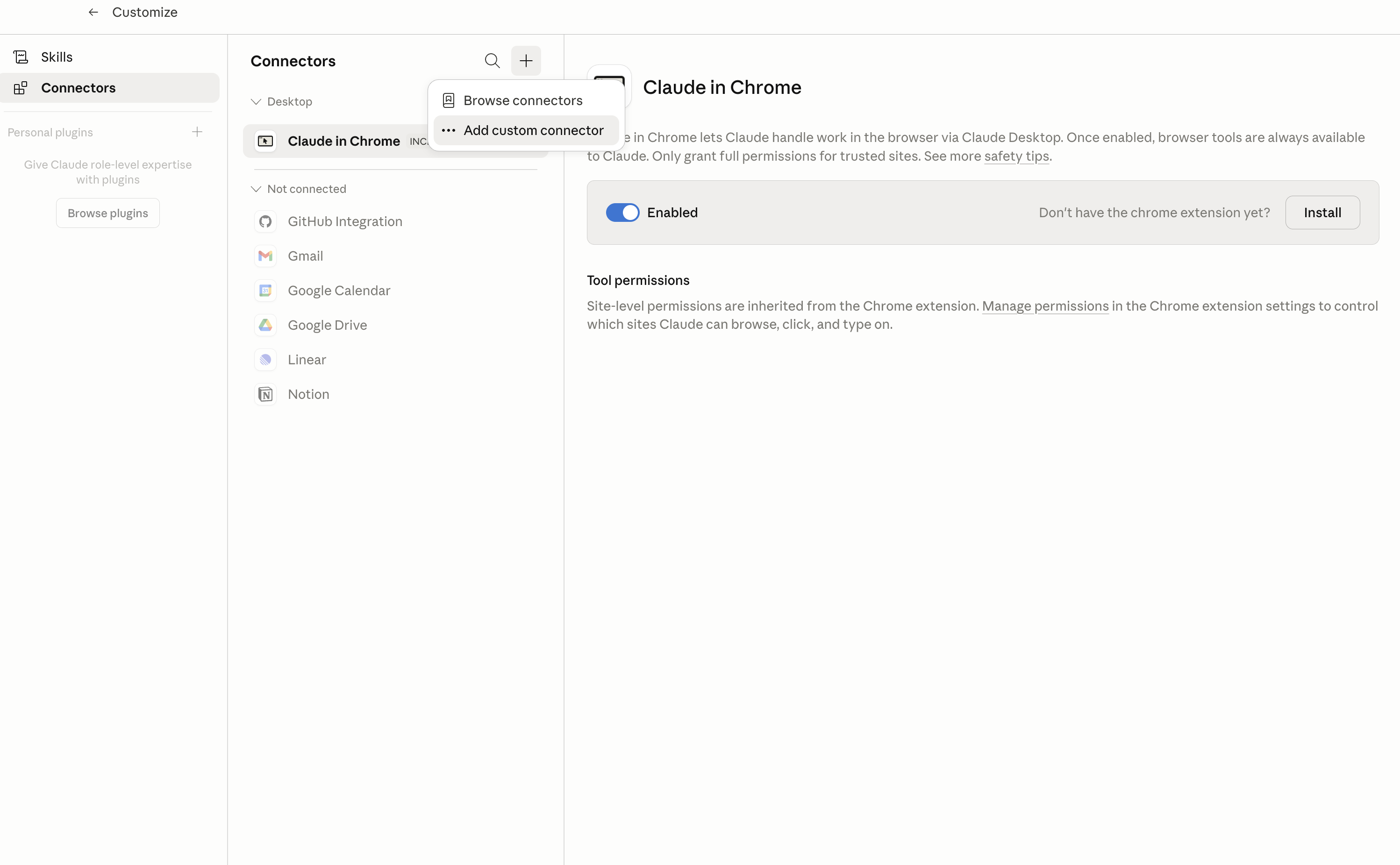
In Claude Desktop, click Customize in the left sidebar, then select Connectors and click the + icon at the top.

Claude Desktop connectors screen with Add custom connector selected

2. Add the Composio MCP server

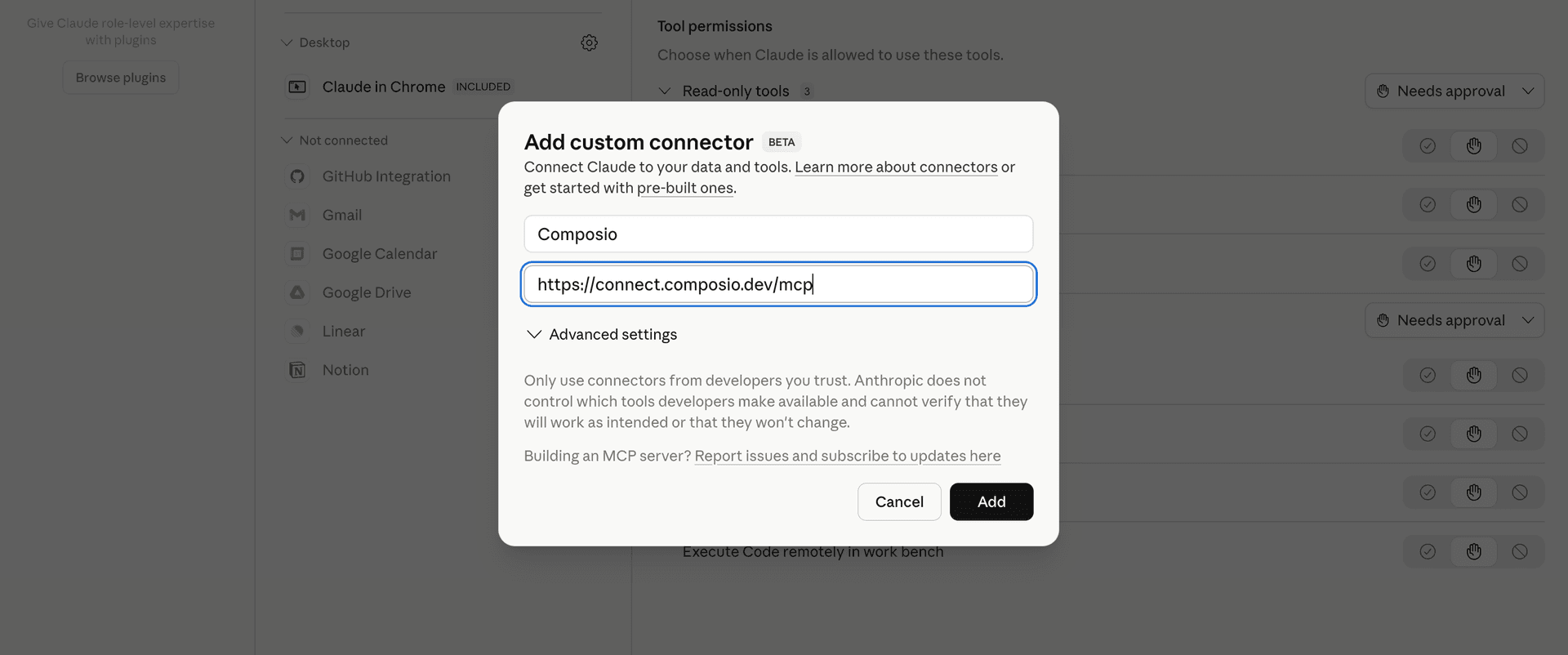
Click Add custom connector and paste in the Composio MCP server URL:

bash
https://connect.composio.dev/mcp
Add custom connector dialog with Composio MCP server URL

3. Authorize in your browser

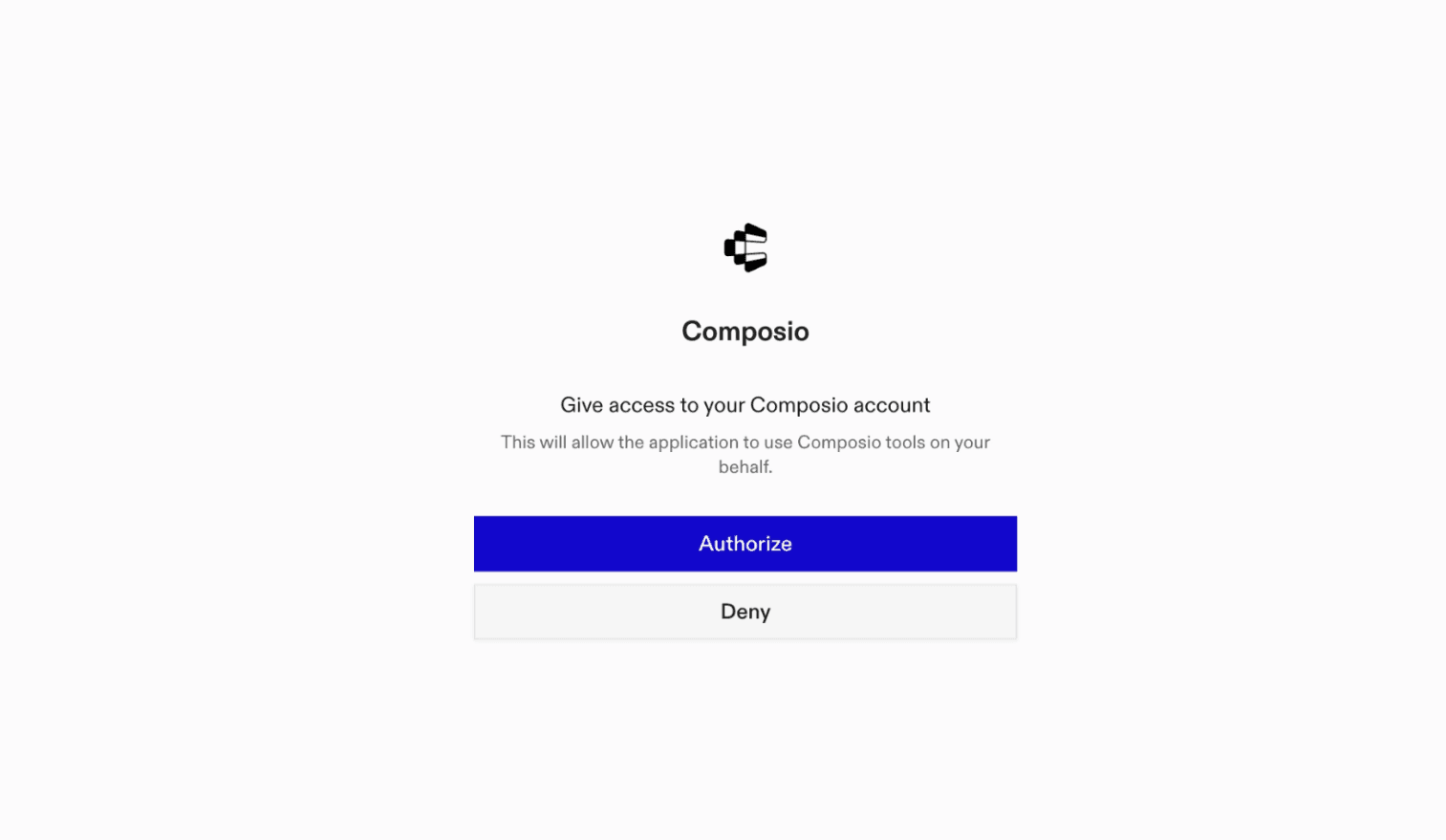
Click Connect. You'll be redirected to a browser window where you can authorize Composio to continue.

Composio authorization screen for Claude Cowork

4. Connect your Google Calendar account

Back in Cowork, ask the agent to connect to Google Calendar or give it any Google Calendar-related task.

For example, ask Cowork to:

  • "Create a meeting with the marketing team"
  • "List all events scheduled for next week"
  • "Delete tomorrow’s canceled event from your calendar"

It will prompt you to authenticate and authorize access.

That's it. Composio's tools are now available in Cowork, and your Google Calendar account is ready to use.

What is Claude Cowork?

Claude Cowork is Anthropic's agent for general knowledge work. It can use your computer, files, and connected applications to complete longer-running tasks across your work tools.

With Composio Connect, Cowork can securely access apps like Google Calendar through MCP without you sharing account credentials directly with the agent.

What is the Google Calendar MCP server, and what's possible with it?

The Google Calendar MCP server is an implementation of the Model Context Protocol that connects your AI agent and assistants like Claude, Cursor, etc directly to your Google Calendar account. It provides structured and secure access to your calendars and events, so your agent can schedule meetings, create or modify events, list upcoming appointments, and manage calendars—all on your behalf.

  • Automated event creation and scheduling: Easily instruct your agent to add new events, meetings, or reminders with specific times, attendees, and details.
  • Event listing and agenda overview: Have your agent list all upcoming, past, or filtered events on any of your calendars to keep you on top of your schedule.
  • Calendar management and customization: Direct your agent to create new calendars, update calendar details, or even insert calendars into your list for better organization.
  • Event updating and deletion: Let your agent modify existing events or remove events that are no longer needed, keeping your calendar up to date.
  • Complete calendar clearing: Ask your agent to clear all events from a primary calendar or delete secondary calendars entirely when you need a fresh start.
TOOLS & TRIGGERS

Supported Tools and Triggers

Every Google Calendar action and event your agent gets out of the box.

Delete ACL Rule

Deletes an access control rule from a Google Calendar.

Get ACL Rule

Retrieves a specific access control rule for a calendar.

Create ACL Rule

Creates an access control rule for a calendar.

List ACL Rules

Retrieves the list of access control rules (ACLs) for a specified calendar, providing the necessary 'rule_id' values required for updating specific ACL rules.

Patch ACL Rule

Updates an existing access control rule for a calendar using patch semantics (partial update).

Update ACL Rule

Updates an access control rule for the specified calendar.

Watch ACL Changes

Tool to watch for changes to ACL resources.

Batch Events

Execute up to 1000 event mutations (create/patch/delete) in one Google Calendar HTTP batch request with per-item status/results.

Remove Calendar from List

Tool to remove a calendar from the user's calendar list.

Get Single Calendar by ID

Retrieves metadata for a SINGLE specific calendar from the user's calendar list by its calendar ID.

Insert Calendar into List

Inserts an existing calendar into the user's calendar list, making it visible in the UI.

Patch Calendar List Entry

Updates an existing calendar on the user's calendar list using patch semantics.

Update Calendar List Entry

Updates a calendar list entry's display/subscription settings (color, visibility, reminders, selection) for the authenticated user — does not modify the underlying calendar resource (title, timezone, etc.

Watch Calendar List

Watch for changes to CalendarList resources using push notifications.

Delete Calendar

Deletes a secondary calendar that you own or have delete permissions on.

Update Calendar

Full PUT-style update that overwrites all calendar metadata fields; unspecified optional fields are cleared.

Stop Channel

Tool to stop watching resources through a notification channel.

Clear Calendar

Clears a primary calendar by deleting all events from it.

Get Color Definitions

Returns the color definitions for calendars and events.

Create Event

Create a Google Calendar event using start_datetime plus duration fields.

Delete event

Deletes a specified event by `event_id` from a Google Calendar (`calendar_id`); idempotent — a 404 for an already-deleted event is a no-op.

Create a calendar

Creates a new, empty Google Calendar with the specified title (summary).

Get Event

Retrieves a SINGLE event by its unique event_id (REQUIRED).

Import Event

Tool to import an event as a private copy to a calendar.

Get Event Instances

Returns instances of the specified recurring event.

List Events

Returns events on the specified calendar.

List Events from All Calendars

Return a unified event list across all calendars in the user's calendar list for a given time range.

Move Event

Moves an event to another calendar, i.

Watch Events

Watch for changes to Events resources.

Find event

Finds events in a specified Google Calendar using text query, time ranges (event start/end, last modification), and event types.

Find free slots

Finds both free and busy time slots in Google Calendars for specified calendars within a defined time range.

Get Google Calendar

Retrieves a specific Google Calendar, identified by `calendar_id`, to which the authenticated user has access.

Get current date and time

Gets the current date and time, allowing for a specific timezone offset.

List Buildings

Lists all buildings for a Google Workspace customer account with full details including addresses, coordinates, and floor names.

List Calendar Resources

Retrieves calendar resources (such as conference rooms) from a Google Workspace domain using the Admin SDK Directory API.

List Google Calendars

Retrieves calendars from the user's Google Calendar list, with options for pagination and filtering.

Patch Calendar

Partially updates (PATCHes) an existing Google Calendar, modifying only the fields provided.

Patch Event

Update specified fields of an existing event in a Google Calendar using patch semantics (array fields like `attendees` are fully replaced if provided); ensure the `calendar_id` and `event_id` are valid and the user has write access to the calendar.

Quick Add Event

Parses natural language text to quickly create a basic Google Calendar event with its title, date, and time, suitable for simple scheduling; does not support direct attendee addition or recurring events, and `calendar_id` must be valid if not 'primary'.

Remove attendee from event

Removes an attendee from a specified event in a Google Calendar; the calendar and event must exist.

Get Calendar Setting

Tool to return a single user setting for the authenticated user.

List Settings

Returns all user settings for the authenticated user.

Watch Settings

Watch for changes to Settings resources.

Update Google event

Updates an existing event in Google Calendar.

FAQ

Frequently asked questions

With a standalone Google Calendar MCP server, the agents and LLMs can only access a fixed set of Google Calendar tools tied to that server. However, with the Composio Tool Router, agents can dynamically load tools from Google Calendar and many other apps based on the task at hand, all through a single MCP endpoint.

Yes, you can. Claude Cowork fully supports MCP integration. You get structured tool calling, message history handling, and model orchestration while Tool Router takes care of discovering and serving the right Google Calendar tools.

Yes, absolutely. You can configure which Google Calendar scopes and actions are allowed when connecting your account to Composio. You can also bring your own OAuth credentials or API configuration so you keep full control over what the agent can do.

All sensitive data such as tokens, keys, and configuration is fully encrypted at rest and in transit. Composio is SOC 2 Type 2 compliant and follows strict security practices so your Google Calendar data and credentials are handled as safely as possible.

Start with Google Calendar.It takes 30 seconds.

Managed auth, hosted MCP servers, and every Google Calendar tool your agent needs.Free to start.

Start building