How to integrate Zoho mail MCP with Hermes

Hermes is a 24/7 autonomous agent that lives on your computer or server — it remembers what it learns and evolves as your usage grows. This guide explains the easiest and most robust way to connect your Zoho mail account to Hermes. You can do this through either Composio Connect CLI or Composio Connect MCP. For personal use we recommend the CLI, but you won't go wrong with MCP either.

Zoho mail logoZoho mail
Oauth2

Zoho Mail is a secure and ad-free email hosting platform with collaboration features. It helps businesses communicate efficiently while maintaining privacy and administrative control.

15 Tools

Introduction

Hermes is a 24/7 autonomous agent that lives on your computer or server — it remembers what it learns and evolves as your usage grows.

This guide explains the easiest and most robust way to connect your Zoho mail account to Hermes. You can do this through either Composio Connect CLI or Composio Connect MCP. For personal use we recommend the CLI, but you won't go wrong with MCP either.

Also integrate Zoho mail with

What is Composio Connect?

Composio Connect is a consumer offering that lets anyone plug 1,000+ applications directly into their agent harness — including Hermes. It can:

  • Search and load tools from relevant toolkits on-demand, reducing context usage.
  • Chain multiple tools to accomplish complex workflows via a remote workbench, without excessive back-and-forth with the LLM.
  • Manage app authentication end-to-end with zero manual overhead.

Integrating Zoho mail with Hermes

Using Composio Connect CLI

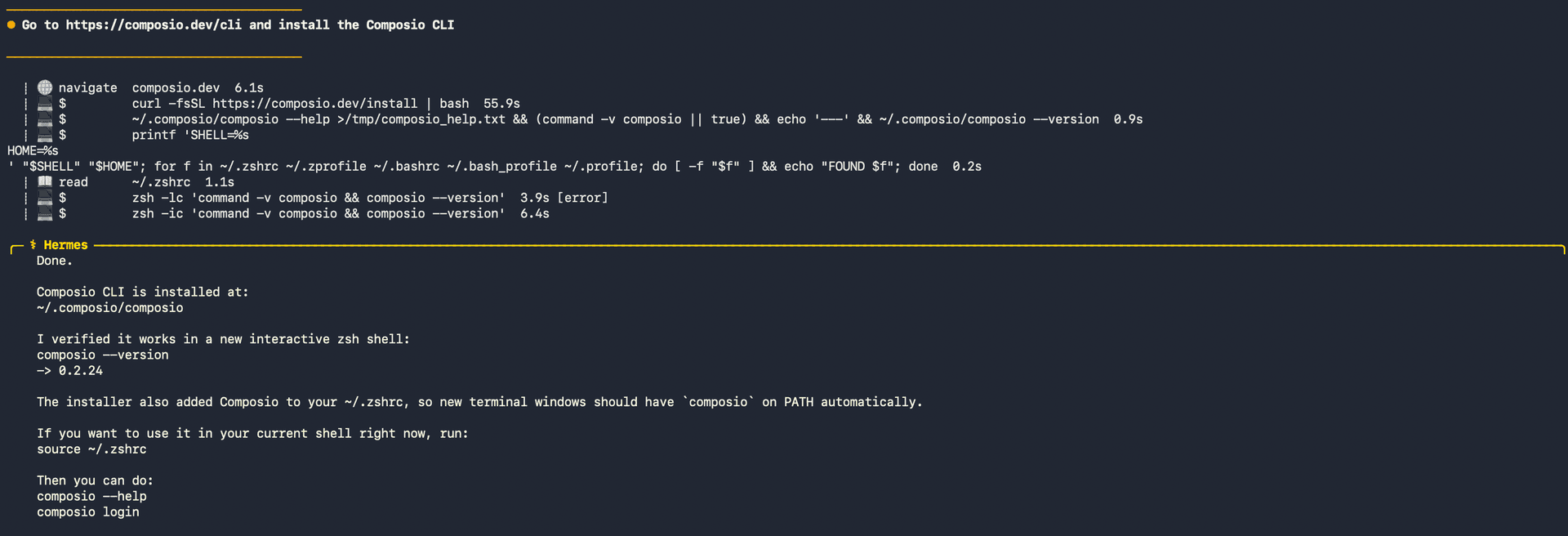
1. Install the Composio CLI

Run the install script directly, or paste https://composio.dev/hermes into your Hermes chat box to have it installed for you.

bash
curl -fsSL https://composio.dev/install | bash
Hermes authenticating with Composio

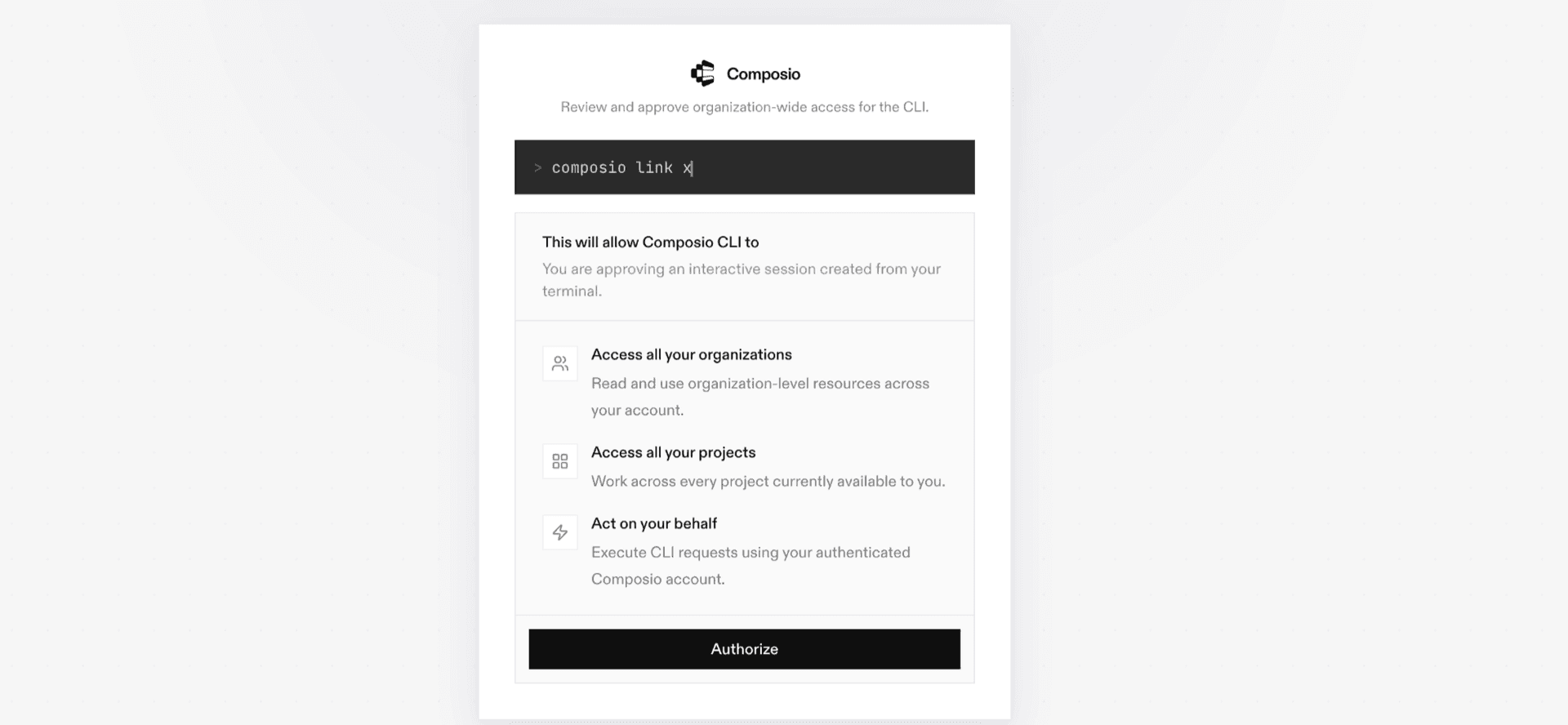
2. Authenticate

Once the CLI is installed, ask Hermes to authenticate with Composio.

3. Connect to Zoho mail

Ask your agent to connect to Zoho mail, or simply request any Zoho mail-related task. Hermes will prompt you to authenticate and authorize access.

4. Done. You're all set with a new Zoho mail connection.


Using Composio Connect MCP

1. Get your MCP URL and API Key

Go to dashboard.composio.dev and copy your Connect MCP URL and API key.

Copy MCP URL and API key from Composio dashboard

2. Open the Hermes config file

bash
nano ~/.hermes/config.yaml

3. Add the Composio Connect MCP server

bash
mcp_servers:
  composio:
    url: "https://connect.composio.dev/mcp"
    headers:
      x-consumer-api-key: "YOUR_COMPOSIO_API_KEY"
    connect_timeout: 60
    timeout: 180

Save with Ctrl + O, Enter, then exit with Ctrl + X.

4. Restart your Hermes agent

Once restarted, ask your agent to connect to Zoho mail or request any Zoho mail-related task. It will prompt you to authenticate and authorize access.

5. Done!

What is the Zoho mail MCP server, and what's possible with it?

The Zoho mail MCP server is an implementation of the Model Context Protocol that connects your AI agent and assistants like Claude, Cursor, etc directly to your Zoho mail account. It provides structured and secure access to your mailbox, so your agent can perform actions like searching emails, sending messages, managing folders, organizing conversations, and handling attachments on your behalf.

  • Smart email search and filtering: Ask your agent to find emails based on sender, subject, keywords, or date ranges for quick information retrieval.
  • Automated composing and sending: Let your agent draft and send new emails, reply to existing threads, or create message templates to streamline communication.
  • Folder and label organization: Have your agent organize your inbox by moving messages to folders, applying tags, or archiving threads for a clutter-free workspace.
  • Attachment management: Retrieve, download, or send attachments through your agent—making file sharing and access seamless within your email workflow.
  • Bulk message actions: Instruct your agent to mark emails as read or unread, star important messages, or clean up your inbox by deleting or archiving in bulk.

Way Forward

With Zoho mail connected, Hermes can now act on your behalf whenever it detects a relevant task or you ask it to.

From here, you can extend Hermes further:

  • Connect more apps: Calendar, Slack, Notion, Linear, and hundreds of others are available through the same Composio Connect setup. Each new integration compounds what Hermes can do for you.
  • Build workflows across tools: Once multiple apps are connected, Hermes can chain actions together — turn an email into a calendar invite, a Slack message into a Linear ticket, or a meeting note into a follow-up draft.
  • Let it learn your patterns: The more you use Hermes, the better it gets at anticipating how you'd handle recurring tasks. Give it feedback on drafts and decisions, and it will adapt.

If you run into trouble or want to share what you've built, join the community or check out the Docs for deeper configuration options.

TOOLS

Supported Tools

Every Zoho mail action and event your agent gets out of the box.

List Zoho Mail Accounts

Retrieves all Zoho Mail accounts associated with the authenticated user.

Domain Operations

Tool to perform domain operations like verify, set primary domain, hosting, aliases, MX/SPF checks, DKIM management, and notifications.

Get All Bookmarks

Tool to retrieve all personal bookmarks from a Zoho Mail account.

Delete Groups in Bulk

Delete multiple groups in a single API call.

Delete Group

Tool to delete a specific mail group by its zgid.

Create Email Draft

Tool to create and save an email draft in Zoho Mail without sending it.

Get Message Content

Tool to retrieve the full content/body of a specific Zoho Mail email.

List Emails

Tool to retrieve a list of emails from a Zoho Mail account folder.

Reply to Email

Tool to reply to an existing email via Zoho Mail API.

Send Email

Tool to send an email via Zoho Mail API.

Get Organization User Storage Details

Tool to retrieve storage details for a specific user in the organization.

Update Organization Spam Process Type

Tool to update organization spam processing type.

Update User Storage

Updates a user's storage allocation within a Zoho Mail organization.

Search Messages

Tool to search emails in a Zoho Mail account using Zoho's searchKey syntax.

Update Group Settings

Tool to update group settings.

FAQ

Frequently asked questions

With a standalone Zoho mail MCP server, the agents and LLMs can only access a fixed set of Zoho mail tools tied to that server. However, with the Composio Tool Router, agents can dynamically load tools from Zoho mail and many other apps based on the task at hand, all through a single MCP endpoint.

Yes, you can. Hermes fully supports MCP integration. You get structured tool calling, message history handling, and model orchestration while Tool Router takes care of discovering and serving the right Zoho mail tools.

Yes, absolutely. You can configure which Zoho mail scopes and actions are allowed when connecting your account to Composio. You can also bring your own OAuth credentials or API configuration so you keep full control over what the agent can do.

All sensitive data such as tokens, keys, and configuration is fully encrypted at rest and in transit. Composio is SOC 2 Type 2 compliant and follows strict security practices so your Zoho mail data and credentials are handled as safely as possible.

Start with Zoho mail.It takes 30 seconds.

Managed auth, hosted MCP servers, and every Zoho mail tool your agent needs.Free to start.

Start building