How to integrate Youtube MCP with ChatGPT

How to integrate Youtube MCP with ChatGPT ChatGPT is one of the most popular AI tools today, with capabilities ranging from deep research and image generation to writing, coding, and everyday productivity. In this guide, I will explain the easiest and most secure way to connect your Youtube account to ChatGPT via Composio Connect, so it can summarize unread updates from this morning, create draft replies to urgent messages, fetch contact details for recent senders, and more without ever putting your account credentials at risk.

Youtube logoYoutube
Oauth2

YouTube is a leading video-sharing platform for uploading, streaming, and discovering content. It empowers creators and businesses to reach global audiences and monetize their work.

47 Tools4 Triggers

How to integrate Youtube MCP with ChatGPT

ChatGPT is one of the most popular AI tools today, with capabilities ranging from deep research and image generation to writing, coding, and everyday productivity.

In this guide, I will explain the easiest and most secure way to connect your Youtube account to ChatGPT via Composio Connect, so it can summarize unread updates from this morning, create draft replies to urgent messages, fetch contact details for recent senders, and more without ever putting your account credentials at risk.

Also integrate Youtube with

Why use Composio over default connectors?

  • Apps with read and write access. Default connectors mostly can read your data. Composio's Youtube integration lets ChatGPT take actions like creating drafts, sending updates, labeling records, and more.
  • 1,000+ SaaS toolkits out of the box. Composio gives you instant access to a vast catalog of pre-built connectors, from Gmail and Slack to Notion, Linear, and Salesforce.
  • One MCP server for every app. Connect any of your applications on demand through a single endpoint, rather than juggling a separate server for each app.
  • Smart, context-aware tool loading. Unlike traditional MCP servers that dump every available tool into the LLM context window, Composio searches for and loads only the tools relevant to the task at hand.
  • Cross-app automation. Chain actions across multiple apps in a single run - fetch a thread, summarize it in Notion, and post highlights to Slack without leaving the conversation.

Prerequisites

  • A ChatGPT account with Plus subscription or higher (Business, Enterprise, Edu, or Pro). We will use ChatGPT Web.
  • Access to the Youtube workspace you want to connect.
  • Composio MCP.

Note: Composio connects through OAuth. You will be asked to sign in and approve specific permissions. Review the permission screen carefully if you are using a work account.

Step-by-step: Connect Youtube to ChatGPT

1. Enable Developer Mode

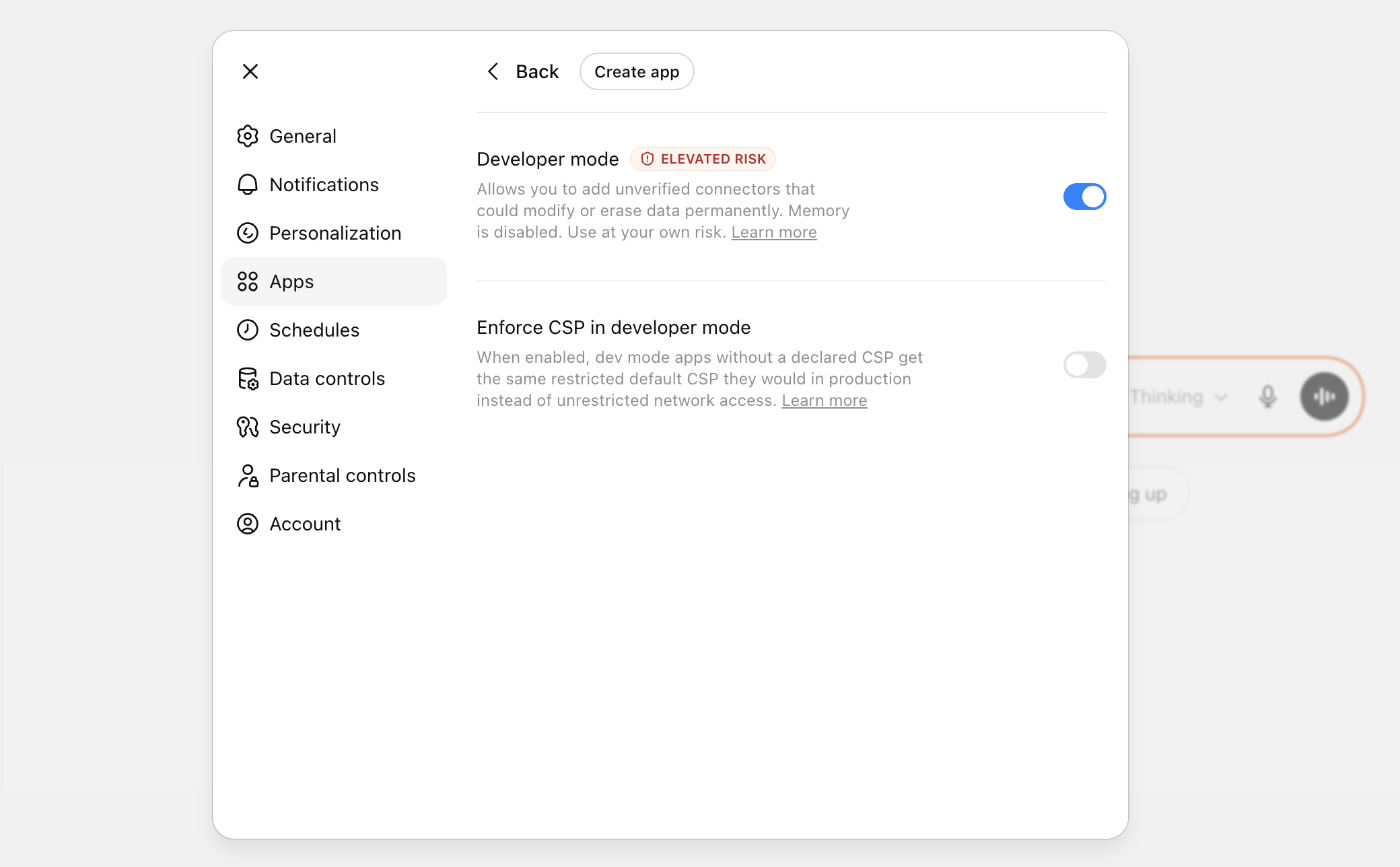
In ChatGPT, go to Settings > Apps > Advanced settings and turn on Developer Mode.

ChatGPT settings showing Developer Mode toggle

2. Add the MCP server

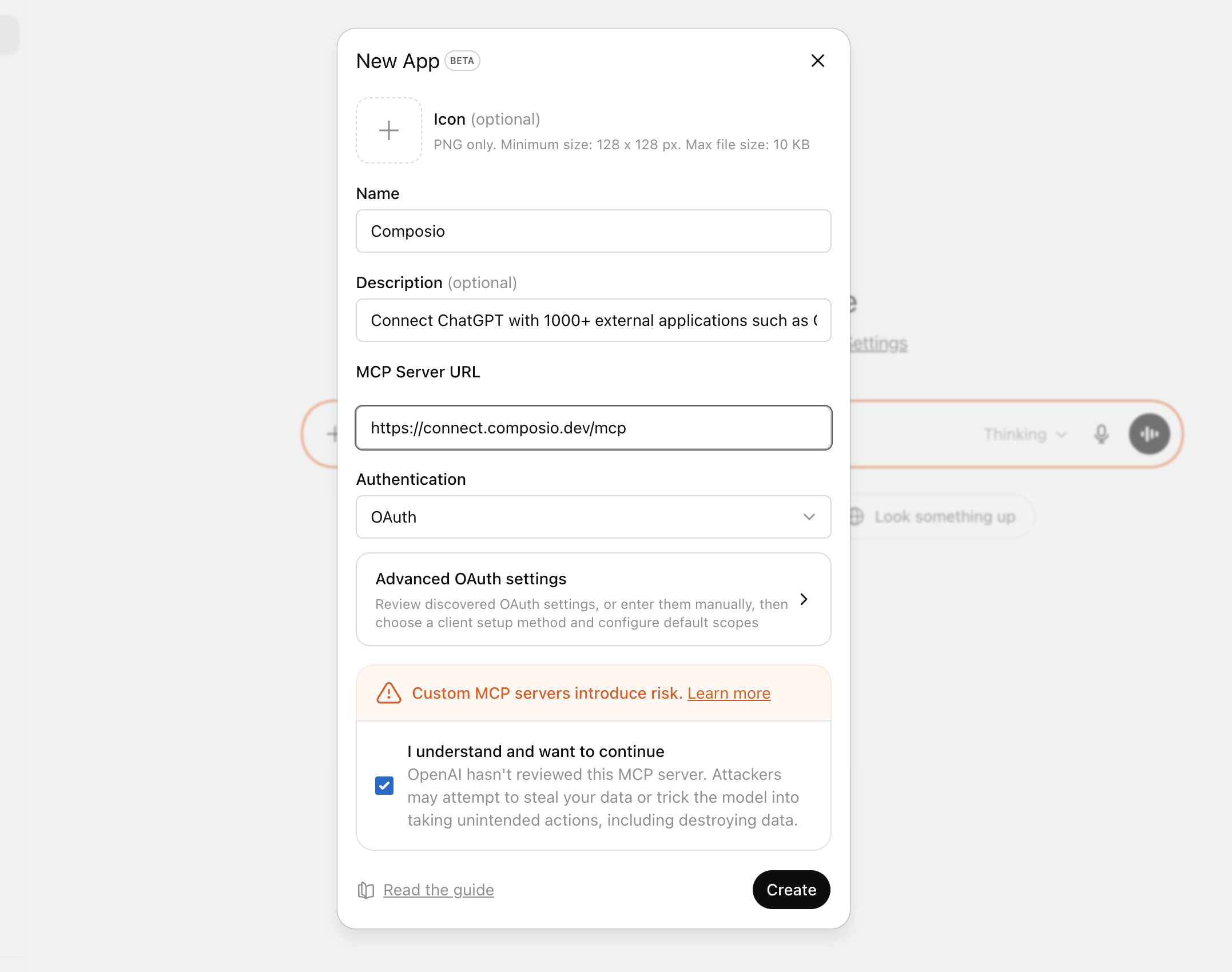
Click Create app, then paste the Composio MCP server URL:

bash
https://connect.composio.dev/mcp
ChatGPT create app flow with Composio MCP URL

3. Authorize in your browser

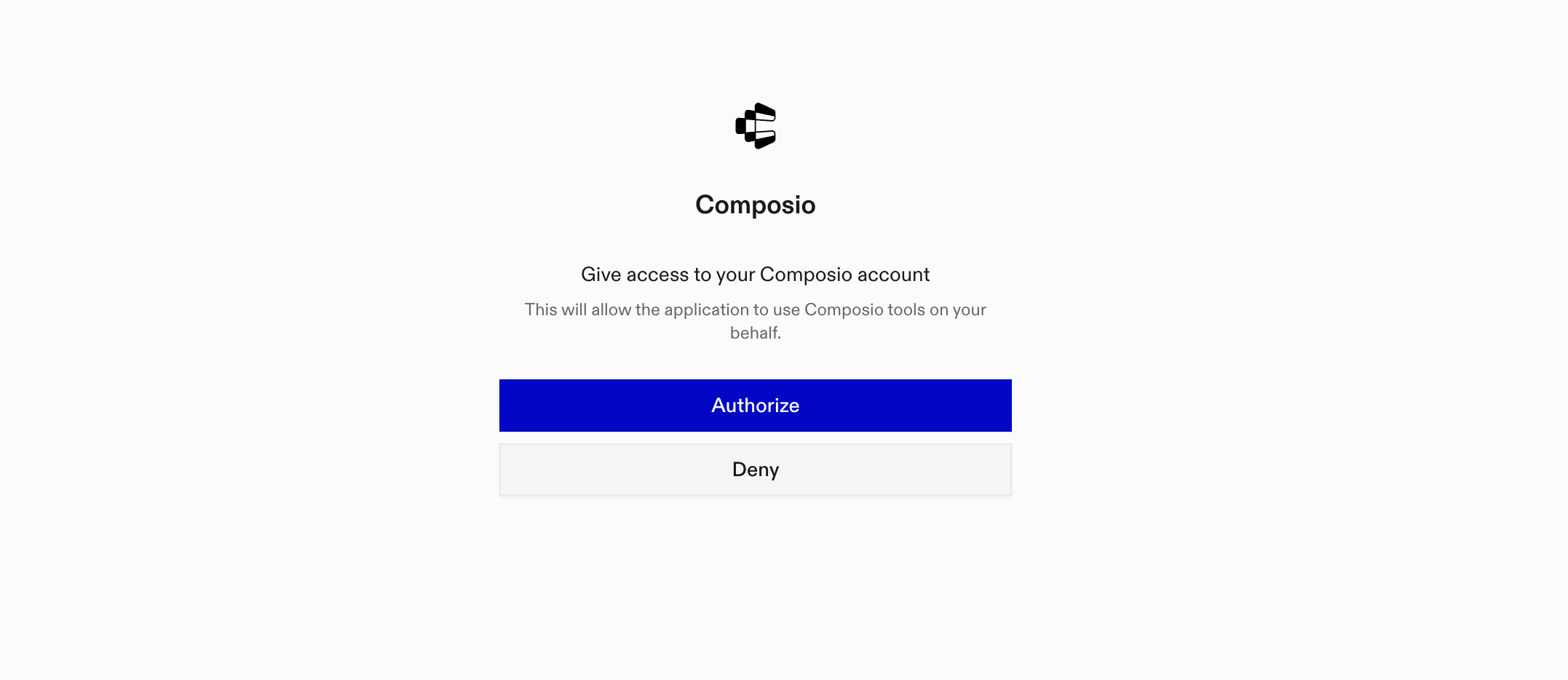
A browser window will open automatically. Sign in to authorize ChatGPT to access your Composio account.

Composio authorization screen for ChatGPT MCP setup

4. Start using Composio

Composio tools are now available in ChatGPT chats and Deep Research. In every new chat, click the + icon at the bottom, click More, and select Composio to enable tools for that conversation.

What you can do after connecting Youtube

  • List your most recent uploaded videos
  • Get subscriber count for your channel
  • Search YouTube for trending tutorials
  • Subscribe me to this channel by handle

Security + privacy notes (important)

  • Use least-privilege access: Only grant permissions you actually need.
  • Review OAuth permissions before approving: Make sure requested scopes match what you expect Composio and ChatGPT to do.
  • Keep write actions human-reviewed: For actions like sending messages, creating labels, or editing drafts, keep manual confirmation enabled.
  • Be careful with sensitive data: Avoid using this setup with highly sensitive information unless allowed by your personal, company, or client policies.
TOOLS & TRIGGERS

Supported Tools and Triggers

Every Youtube action and event your agent gets out of the box.

Add Video to Playlist

Tool to add a video to a playlist by inserting a playlist item.

Insert Channel Section

Tool to create a new channel section for the authenticated user's YouTube channel.

Insert Comment Reply

Tool to create a reply to an existing YouTube comment.

Create Playlist

Tool to create a new YouTube playlist on the authenticated user's channel.

Delete Channel Section

Tool to delete a YouTube channel section.

Delete Comment

Tool to delete a YouTube comment owned by the authenticated user or channel.

Delete Playlist

Tool to delete a YouTube playlist owned by the authenticated user/channel.

Delete Playlist Item

Tool to delete a playlist item (remove a video from a playlist).

Delete Video

Tool to delete a YouTube video owned by the authenticated user/channel.

Get Channel Activities

Gets recent activities from a YouTube channel including video uploads, playlist additions, likes, and other channel events.

Get channel ID by handle

Retrieves the YouTube Channel ID for a specific YouTube channel handle.

Get Channel Statistics

Gets detailed statistics for YouTube channels including subscriber counts, view counts, and video counts.

Video Details Batch

Retrieves multiple YouTube video resource parts in a single batch call.

Get Video Rating

Retrieves the ratings that the authorized user gave to a list of specified videos.

List captions

Retrieves a list of caption tracks for a YouTube video.

List Channel Sections

Tool to retrieve channel sections from YouTube.

List channel videos

Lists videos from a specified YouTube channel.

List Comments

List individual comments from YouTube videos.

List Comment Threads

Tool to retrieve comment threads from YouTube videos or channels matching API request parameters.

List I18n Languages

Returns a list of application languages that the YouTube website supports.

List I18n Regions

Tool to retrieve a list of content regions that the YouTube website supports.

List Live Chat Messages

Tool to list live chat messages for a specific chat.

List Playlist Images

Tool to retrieve playlist images associated with a specific playlist.

List Playlist Items

Tool to list videos in a playlist, with pagination support.

List Super Chat Events

Lists Super Chat events for a channel, showing supporter purchases during live streams.

List user playlists

Retrieves playlists owned by the authenticated user, implicitly using mine=True.

List user subscriptions

Retrieves the authenticated user's YouTube channel subscriptions, allowing specification of response parts and pagination.

List Video Abuse Report Reasons

Tool to retrieve a list of abuse report reasons that can be used to report abusive videos on YouTube.

List Video Categories

Tool to list YouTube video categories that can be associated with videos.

Download YouTube caption track

Downloads a specific YouTube caption track, which must be owned by the authenticated user, and returns its content as text.

Multipart upload video

Uploads a video to YouTube using multipart upload in a single request.

Post Comment on Video

Tool to post a new top-level comment on a YouTube video.

Rate Video

Tool to add a like or dislike rating to a YouTube video, or remove an existing rating.

Report Video for Abuse

Tool to report a YouTube video for containing abusive content.

Search YouTube

Searches YouTube for videos, channels, or playlists using a query term, returning the raw API response.

Set Comment Moderation Status

Tool to set the moderation status of one or more YouTube comments.

Subscribe to channel

Subscribes the authenticated user to a specified YouTube channel, identified by its unique `channelId` which must be valid and existing.

Unsubscribe from channel

Tool to unsubscribe the authenticated user from a YouTube channel by deleting a subscription.

Update caption track

Updates a YouTube caption track's metadata such as name, language, or draft status.

Update channel

Updates a channel's metadata including branding settings and localizations.

Update Channel Section

Tool to update an existing YouTube channel section by ID.

Update Comment

Tool to modify the text of an existing YouTube comment.

Update Playlist

Tool to modify an existing YouTube playlist's metadata (title, description, privacy status).

Update Playlist Item

Tool to modify a playlist item's properties such as position or note.

Update thumbnail

Sets the custom thumbnail for a YouTube video using an image from a URL.

Update video

Updates metadata for a YouTube video identified by videoId, which must exist; an empty list for tags removes all existing tags.

Upload video

Uploads a video from a local file path to a YouTube channel; the video file must be in a YouTube-supported format.

FAQ

Frequently asked questions

With a standalone Youtube MCP server, the agents and LLMs can only access a fixed set of Youtube tools tied to that server. However, with the Composio Tool Router, agents can dynamically load tools from Youtube and many other apps based on the task at hand, all through a single MCP endpoint.

Yes, you can. ChatGPT fully supports MCP integration. You get structured tool calling, message history handling, and model orchestration while Tool Router takes care of discovering and serving the right Youtube tools.

Yes, absolutely. You can configure which Youtube scopes and actions are allowed when connecting your account to Composio. You can also bring your own OAuth credentials or API configuration so you keep full control over what the agent can do.

All sensitive data such as tokens, keys, and configuration is fully encrypted at rest and in transit. Composio is SOC 2 Type 2 compliant and follows strict security practices so your Youtube data and credentials are handled as safely as possible.

Start with Youtube.It takes 30 seconds.

Managed auth, hosted MCP servers, and every Youtube tool your agent needs.Free to start.

Start building