How to integrate Dropbox MCP with Codex

Codex is one of the most popular coding harnesses out there. And MCP makes the experience even better. With Dropbox MCP integration, you can draft, triage, summarise emails, and much more, all without leaving the terminal or the app, whichever you prefer.

Dropbox logoDropbox
Oauth2

Dropbox is a cloud storage service for file syncing, sharing, and collaboration. It keeps your files accessible, organized, and safe across all your devices.

174 Tools

Introduction

Codex is one of the most popular coding harnesses out there. And MCP makes the experience even better. With Dropbox MCP integration, you can draft, triage, summarise emails, and much more, all without leaving the terminal or the app, whichever you prefer.

Also integrate Dropbox with

Why use Composio?

Apart from a managed and hosted MCP server, you will get:

  • CodeAct: A dedicated workbench that allows GPT to write its code to handle complex tool chaining. Reduces to-and-fro with LLMs for frequent tool calling.
  • Large tool responses: Handle them to minimise context rot.
  • Dynamic just-in-time access to 20,000 tools across 1000+ other Apps for cross-app workflows. It loads the tools you need, so GPTs aren't overwhelmed by tools you don't need.

How to install Dropbox MCP in Codex

Run the setup command

Run this command in your terminal to add the Composio MCP server to Codex.

Terminal

It will initiate the authentication in a browser window, authorize Codex to access your Composio account.
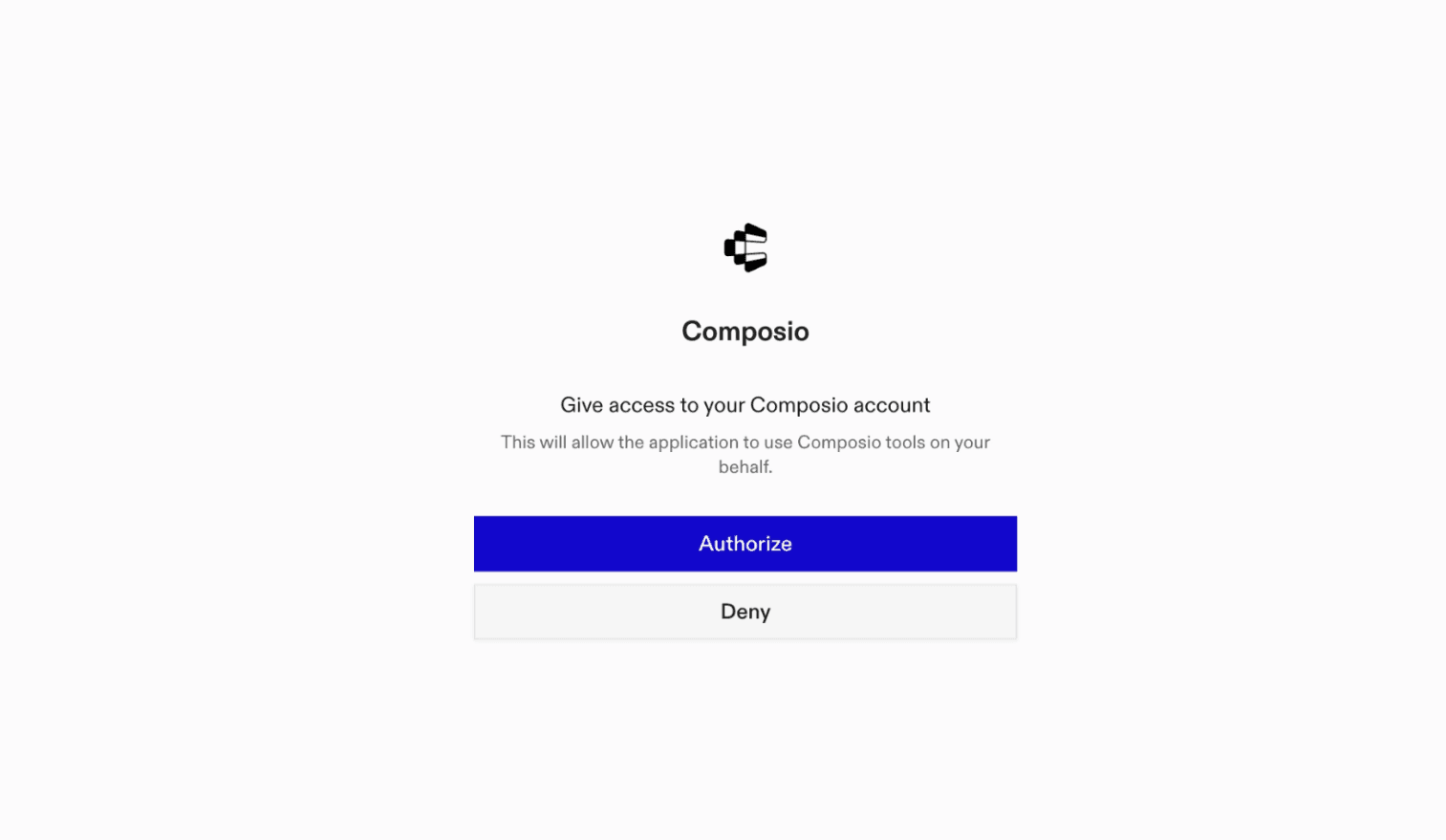
Composio authentication page

(Optional) Authenticate with OAuth

To authenticate manually, run the login command to open a browser window and authorize Codex to access your Composio account.

bash
codex mcp login composio

Verify the connection

Run codex mcp list to confirm Composio appears as a registered MCP server.

bash
codex mcp list

Codex App

Codex App follows the same approach as VS Code.

  1. Click ⚙️ on the bottom left → MCP Servers → + Add servers → Streamable HTTP:
  2. Fill the header and Key fields with { "x-consumer-api-key" = "ck_*******" }.
  3. The Key is the Composio API key, that you can find on dashboard.composio.dev
  4. Click on Authenticate and authorize Codex to your Composio account and you're all set.
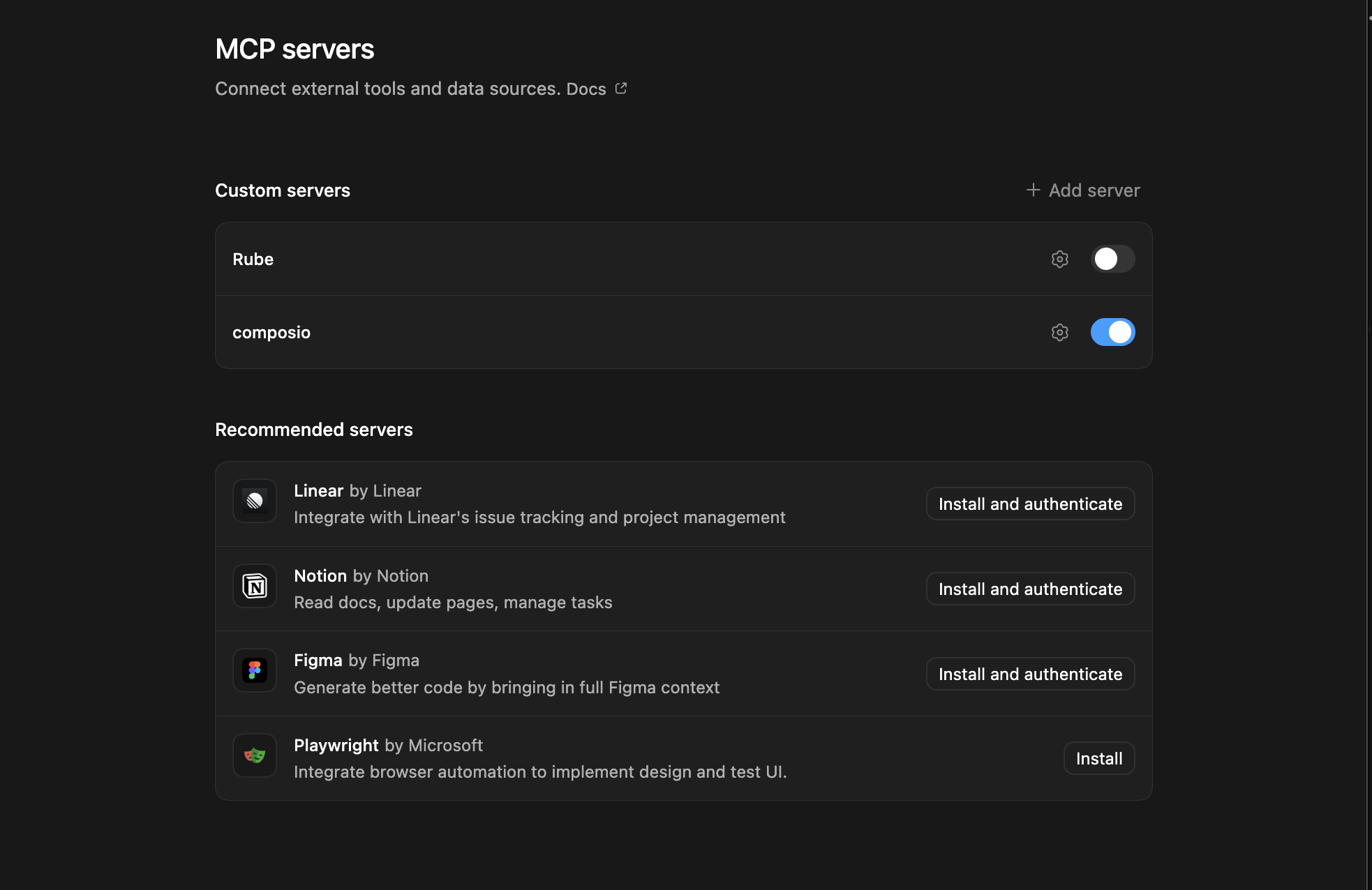
Codex App MCP setup
  1. Restart and verify if it's there in .codex/config.toml
bash
[mcp_servers.composio]
url = "https://connect.composio.dev/mcp"
http_headers = { "x-consumer-api-key" = "ck_*******" }

What is the Dropbox MCP server, and what's possible with it?

The Dropbox MCP server is an implementation of the Model Context Protocol that connects your AI agent and assistants like Claude, Cursor, etc directly to your Dropbox account. It provides structured and secure access to your cloud files, so your agent can perform actions like searching, uploading, organizing, reading, and deleting files and folders on your behalf.

  • Smart file search and retrieval: Ask your agent to search for files or folders by name, keyword, or within specific directories, and quickly locate what you need.
  • Automated file uploads and folder creation: Direct your agent to create new folders for organization or request file uploads with unique shareable links, streamlining content collection and storage.
  • Seamless file reading and downloads: Have your agent read the contents of any file or download important documents from your Dropbox, whenever you need them.
  • Effortless organization and cleanup: Let your agent move, delete, or reorganize files and folders to keep your Dropbox tidy and efficient.
  • Account insights and management: Retrieve up-to-date details about your Dropbox account, including user info and storage status, for complete oversight.

Conclusion

You've successfully integrated Dropbox with Codex using Composio's MCP server. Now you can interact with Dropbox directly from your terminal, VS Code, or the Codex App using natural language commands.

Key benefits of this setup:

  • Seamless integration across CLI, VS Code, and standalone app
  • Natural language commands for Dropbox operations
  • Managed authentication through Composio
  • Access to 20,000+ tools across 1000+ apps for cross-app workflows
  • CodeAct workbench for complex tool chaining

Next steps:

  • Try asking Codex to perform various Dropbox operations
  • Explore cross-app workflows by connecting more toolkits
  • Build automation scripts that leverage Codex's AI capabilities
TOOLS

Supported Tools

Every Dropbox action and event your agent gets out of the box.

Activate team folder

Tool to activate an archived team folder.

Add file member

Tool to add specified members to a Dropbox file with configurable access levels.

Add file properties

Tool to add custom properties to a Dropbox file using a filled property template.

Add tag to file or folder

Tool to add a tag to a file or folder in Dropbox.

Add folder member

Tool to add members to a shared folder with specified access levels.

Add users to space limits exclusion list

Tool to add users to the team's space limits exclusion list in Dropbox.

Add sharing allowlist

Tool to add domains or email addresses to the team sharing allowlist.

Add members to team group

Tool to add members to a team group with specified access levels.

Add team members

Tool to add new members to a Dropbox team.

Add secondary emails to team members

Tool to add secondary email addresses to Dropbox team members.

Add property template for team

Tool to add a property template for a team in Dropbox.

Alpha Upload File

Tool to upload a new file to Dropbox using the alpha upload endpoint.

Append data to upload session

Tool to append more data to an existing upload session.

Append to multiple upload sessions

Tool to append data to multiple upload sessions in a single request.

Archive team folder

Tool to archive an active team folder in Dropbox.

Check copy batch job status

Tool to check the status of an asynchronous copy batch job in Dropbox.

Check delete batch status

Tool to check the status of an asynchronous delete batch job in Dropbox.

Check folder batch status

Tool to check the status of an asynchronous folder batch creation job.

Check sharing job status

Tool to check the status of an asynchronous sharing job in Dropbox.

Check move batch job status

Tool to check the status of an asynchronous move batch job.

Check move former member files job status

Tool to check the status of an asynchronous move former member files job.

Check remove member job status

Tool to check the status of an asynchronous remove folder member job in Dropbox.

Check save URL job status

Tool to check the status of a save_url job in Dropbox.

Check share job status

Tool to check the status of an asynchronous folder sharing job in Dropbox.

Check team folder archive status

Tool to check the status of an asynchronous team folder archive job in Dropbox.

Check upload batch status

Tool to check the status of an asynchronous upload batch job in Dropbox.

Check user

Tool to test Dropbox API connection and validate access token by echoing back a supplied string.

Copy multiple files or folders

Tool to copy multiple files or folders to different locations at once in Dropbox.

Copy file or folder

Tool to copy a file or folder to a different location in Dropbox.

Count file requests

Tool to get the total number of file requests owned by the authenticated user.

Create file request

Tool to create a new file request in Dropbox.

Create folder

Tool to create a new folder at a specified path in Dropbox.

Create multiple folders

Tool to create multiple folders at once in Dropbox.

Create paper document

Creates a new Dropbox Paper document at the specified path using HTML or Markdown content.

Create Paper folder

Tool to create a new Paper folder with the provided info.

Create shared link

Tool to create a stable, long-lived shared link for a Dropbox file or folder.

Create team folder

Tool to create a new, active team folder with no members in Dropbox.

Create team group

Tool to create a new, empty team group in Dropbox with a specified name.

Delete all closed file requests

Tool to delete all closed file requests owned by the current user.

Delete multiple files/folders

Tool to delete multiple files or folders at once in Dropbox.

Delete file or folder

Tool to delete a file or folder at the specified path in Dropbox.

Delete file requests

Tool to delete a batch of closed file requests in Dropbox.

Delete manual contacts batch

Tool to delete specific manually added contacts from Dropbox by their email addresses.

Permanently delete archived team folder

Tool to permanently delete an archived team folder in Dropbox.

Delete team group

Tool to delete a Dropbox team group.

Delete team member profile photo

Tool to delete a team member's profile photo.

Delete team members secondary emails

Tool to delete secondary email addresses from Dropbox team members.

Download Folder as Zip

Tool to download a folder from Dropbox as a zip file.

Export File

Tool to export non-downloadable Dropbox files (especially Dropbox Paper) to Markdown/HTML/plain text and return usable content.

Search files and folders

Tool to search for files and folders in Dropbox by name or content.

Finish upload session

Tool to finish an upload session and save the uploaded data to the given file path.

Finish batch upload sessions

Tool to commit many files at once into a user's Dropbox after uploading file contents via upload_session/start and upload_session/append.

Get about me

Tool to get information about the current user's Dropbox account.

Get account

Tool to get information about a user's Dropbox account using their account ID.

Get account batch

Tool to get information about multiple user accounts in a single request.

Get available team member roles

Tool to retrieve all available team member roles for the connected Dropbox team.

Get copy reference

Tool to get a copy reference to a file or folder.

Get file lock batch

Tool to return lock metadata for multiple files in a single batch request.

Get shared file metadata batch

Tool to retrieve metadata for multiple shared files in a single batch request.

Get file preview

Tool to get a preview for a file.

Get file request details

Tool to retrieve details of an existing file request by ID.

Get file or folder tags

Tool to get list of tags assigned to files or folders in Dropbox.

Get folder state cursor

Tool to get a cursor representing the current state of a folder without listing its contents.

Get JWKS

Tool to retrieve JSON Web Key Set containing public verification keys for Dropbox signed ID tokens.

Get file or folder metadata

Tool to fetch metadata for a file or folder by path.

Get file or folder metadata (alpha)

Tool to fetch metadata for a file or folder using the alpha endpoint.

Get OpenID config

Tool to retrieve Dropbox's OpenID Connect discovery document describing supported OAuth 2.

Get shared file metadata

Tool to retrieve metadata for a shared file in Dropbox.

Get shared folder metadata

Tool to retrieve metadata for a specific shared folder by its ID.

Download file from shared link

Tool to download a file from a Dropbox shared link.

Get shared link metadata

Tool to resolve a Dropbox shared link URL into structured metadata.

Get space usage

Tool to get space usage information for the current user's Dropbox account.

Get team feature values

Tool to get values for one or more team features.

Get team folder info

Tool to retrieve metadata for team folders.

Get team groups info

Tool to retrieve information about one or more team groups by their IDs or external IDs.

Get team groups job status

Tool to check the status of an asynchronous team groups job in Dropbox.

Get team info

Tool to retrieve information about a Dropbox team.

Get team audit log events

Tool to retrieve team audit log events from Dropbox.

Get team log events (continue)

Tool to paginate through team audit log events using a cursor from team_log/get_events.

Get team member custom quota

Tool to retrieve custom storage quotas for team members.

Get team members add job status v2

Tool to poll the status of an asynchronous team member addition job.

Get team members info

Tool to retrieve information about multiple team members in a single request.

Get property template for team

Tool to get the schema for a specified property template for a team.

Get temporary link

Tool to get a one-click temporary (expiring) download link.

Get temporary upload link

Tool to get a one-time use temporary upload link to upload a file to Dropbox.

Get thumbnail

Tool to get a thumbnail for an image file.

Get thumbnail batch

Tool to get thumbnails for multiple image files in a single batch request.

Get thumbnail v2

Tool to get a thumbnail for an image file.

Get user features

Tool to get a list of feature values configured for the current Dropbox account.

List member space limits excluded users (continue)

Tool to paginate through team members excluded from space limits using a cursor from a previous list call.

List file members

Tool to obtain the members who have been invited to a file, both inherited and uninherited members.

List file members batch

Tool to get members of multiple files at once.

List file requests

Tool to list all file requests owned by the current user.

List file requests (continue)

Tool to paginate through file requests using a cursor from a previous list call.

List file revisions

Tool to retrieve the revision history for a file.

List files in folder

Tool to list files and folders in a specified Dropbox directory.

List folder continue

Tool to continue paginating through folder contents using a cursor from list_folder.

List folder members

Tool to list members of a shared folder, including users, groups, and invitees.

List folder members continue

Tool to continue paginating through shared folder members using a cursor from list_folder_members.

List shared folders continue

Tool to continue paginating through shared folders using a cursor from list_folders.

List member linked apps

Tool to list all applications linked to a specific team member's account.

List excluded users from space limits

Tool to list team members excluded from space limits.

List mountable folders

Tool to list all shared folders the current user can mount or unmount.

List mountable folders continue

Tool to paginate through mountable shared folders using a cursor.

List Paper docs

Tool to return the list of all Paper docs according to filter and sort specifications.

List Paper documents (continue)

Tool to continue paginating through Paper documents using a cursor from paper/docs/list.

List received files

Tool to list all files shared with the current user.

List shared folders

Tool to list all shared folders the authenticated user has access to.

List shared links

Tool to list existing shared links for the current user, optionally filtered by path.

List team sharing allowlist

Tool to list Approve List entries for a team from newest to oldest.

List team devices

Tool to list all device sessions of a team including web sessions, desktop clients, and mobile clients.

List team folders

Tool to list all team folders for a Dropbox Business team.

List team folders continue

Tool to continue paginating through team folders using a cursor from team_folder/list.

List team group members

Tool to list members of a Dropbox team group.

List team groups

Tool to list all groups on a Dropbox team.

List team groups continue

Tool to continue listing team groups using a cursor from team/groups/list.

List team group members continue

Tool to continue listing team group members using a cursor from team/groups/members/list.

List members linked apps

Tool to list all applications linked to team members' accounts.

List team member devices

Tool to list all device sessions of a team's member, including web sessions, desktop clients, and mobile clients.

List team members

Tool to list members of a Dropbox team.

List team members continue (v2)

Tool to continue listing team members using a cursor from team/members/list or team/members/list/continue_v2.

List team namespaces

Tool to list all team-accessible namespaces in a Dropbox Business team.

List team namespaces continue

Tool to continue paginating through team-accessible namespaces using a cursor from team/namespaces/list.

List team sharing allowlist continue

Tool to continue paginating through team sharing allowlist entries using a cursor.

List property templates for team

Tool to list all property templates for a team.

List user templates

Tool to get the template identifiers for a user.

Modify shared link settings

Tool to modify settings of an existing Dropbox shared link.

Mount shared folder

Tool to mount a shared folder for the current user after they have been added as a member.

Move multiple files or folders in batch

Tool to move multiple files or folders to different locations at once in Dropbox.

Move file or folder

Move file or folder

Overwrite file properties

Tool to overwrite property groups associated with a file or folder.

Read a file

Downloads a file from the specified Dropbox path, requiring `files.

Remove file member

Tool to remove a specified member from a file's sharing permissions.

Remove File Properties

Tool to permanently remove specified property groups from a file or folder.

Remove file properties template for team

Tool to remove a property template from a team.

Remove tag from file or folder

Tool to remove a tag from a file or folder in Dropbox.

Remove folder member

Tool to remove a member from a shared folder.

Remove group members

Tool to remove members from a Dropbox team group.

Remove sharing allowlist

Tool to remove domains or email addresses from the team sharing allowlist.

Remove team member custom quota

Tool to remove custom storage quota for team members, reverting them to the team's default quota.

Remove member space limits excluded users

Tool to remove users from the member space limits excluded users list.

Rename team folder

Tool to rename an existing team folder in Dropbox.

Resend secondary email verification

Tool to resend secondary email verification emails to team members.

Restore file to specific revision

Tool to restore a specific revision of a file to the given path in Dropbox.

Revoke shared link

Tool to revoke a Dropbox shared link.

Save copy reference

Tool to save a copy reference to the user's Dropbox.

Save file from URL

Tool to save a file to Dropbox directly from a public URL via server-side fetch.

Continue Dropbox Search

Tool to fetch the next page of search results from a previous Dropbox search.

Search File or Folder

Tool to search for files and folders in Dropbox by name or content, optionally scoped to a path, with pagination support.

Search File Properties

Tool to search across property templates for particular property field values.

Send team member welcome email

Tool to send a welcome email to a pending team member.

Set profile photo

Tool to set the profile photo for the current user's Dropbox account.

Set team member custom quota

Tool to set custom storage quotas for team members in Dropbox.

Share folder

Tool to share a folder with collaborators in Dropbox.

Start upload session

Tool to start a new upload session with the given data.

Start batch of upload sessions

Tool to start a batch of upload sessions.

Unlock multiple files

Tool to unlock multiple files at specified paths in a single batch operation.

Unmount shared folder

Tool to unmount a shared folder for the current user.

Unshare file

Tool to remove all members from a Dropbox file.

Unshare folder

Tool to allow a shared folder owner to unshare the folder.

Update file member

Tool to change a member's access level on a shared file.

Update file properties

Tool to update custom properties on a file or folder in Dropbox.

Update file request

Tool to update an existing file request in Dropbox.

Update folder member

Tool to update another member's permissions in a shared folder.

Update folder policy

Tool to update the sharing policies for a shared folder.

Set group member access type

Tool to change a member's access type in a team group.

Update Paper Document

Tool to update an existing Dropbox Paper document with new content in Markdown, HTML, or plain text format.

Update property template for team

Tool to update a property template for a team in Dropbox.

Update team folder sync settings

Tool to update the sync settings on a team folder or its contents in Dropbox.

Update team group

Tool to update a team group's name, external ID, and/or management type.

Set team member admin permissions

Tool to update a team member's admin permissions.

Set team member profile

Tool to update a team member's profile information.

Set team member profile photo

Tool to update a team member's profile photo.

Upload File

Uploads a file (up to ~150 MB) to a specified path in the user's Dropbox, with options for handling existing files.

FAQ

Frequently asked questions

With a standalone Dropbox MCP server, the agents and LLMs can only access a fixed set of Dropbox tools tied to that server. However, with the Composio Tool Router, agents can dynamically load tools from Dropbox and many other apps based on the task at hand, all through a single MCP endpoint.

Yes, you can. Codex fully supports MCP integration. You get structured tool calling, message history handling, and model orchestration while Tool Router takes care of discovering and serving the right Dropbox tools.

Yes, absolutely. You can configure which Dropbox scopes and actions are allowed when connecting your account to Composio. You can also bring your own OAuth credentials or API configuration so you keep full control over what the agent can do.

All sensitive data such as tokens, keys, and configuration is fully encrypted at rest and in transit. Composio is SOC 2 Type 2 compliant and follows strict security practices so your Dropbox data and credentials are handled as safely as possible.

Start with Dropbox.It takes 30 seconds.

Managed auth, hosted MCP servers, and every Dropbox tool your agent needs.Free to start.

Start building