How to integrate Cardly MCP with Hermes

Hermes is a 24/7 autonomous agent that lives on your computer or server — it remembers what it learns and evolves as your usage grows. This guide explains the easiest and most robust way to connect your Cardly account to Hermes. You can do this through either Composio Connect CLI or Composio Connect MCP. For personal use we recommend the CLI, but you won't go wrong with MCP either.

Cardly logoCardly
Api Key

Cardly is a platform for creating and sending personalized direct mail to customers. It helps businesses break through the digital clutter by getting real engagement via physical mailboxes.

29 Tools

Introduction

Hermes is a 24/7 autonomous agent that lives on your computer or server — it remembers what it learns and evolves as your usage grows.

This guide explains the easiest and most robust way to connect your Cardly account to Hermes. You can do this through either Composio Connect CLI or Composio Connect MCP. For personal use we recommend the CLI, but you won't go wrong with MCP either.

Also integrate Cardly with

What is Composio Connect?

Composio Connect is a consumer offering that lets anyone plug 1,000+ applications directly into their agent harness — including Hermes. It can:

  • Search and load tools from relevant toolkits on-demand, reducing context usage.
  • Chain multiple tools to accomplish complex workflows via a remote workbench, without excessive back-and-forth with the LLM.
  • Manage app authentication end-to-end with zero manual overhead.

Integrating Cardly with Hermes

Using Composio Connect CLI

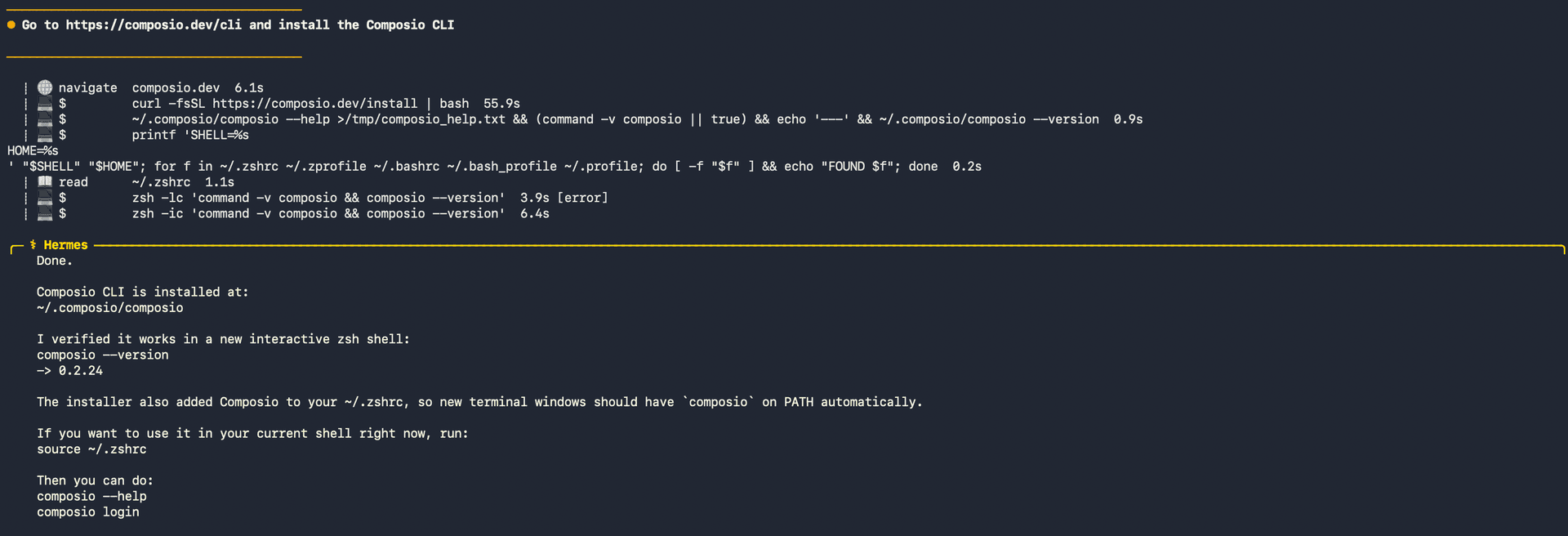
1. Install the Composio CLI

Run the install script directly, or paste https://composio.dev/hermes into your Hermes chat box to have it installed for you.

bash
curl -fsSL https://composio.dev/install | bash
Hermes authenticating with Composio

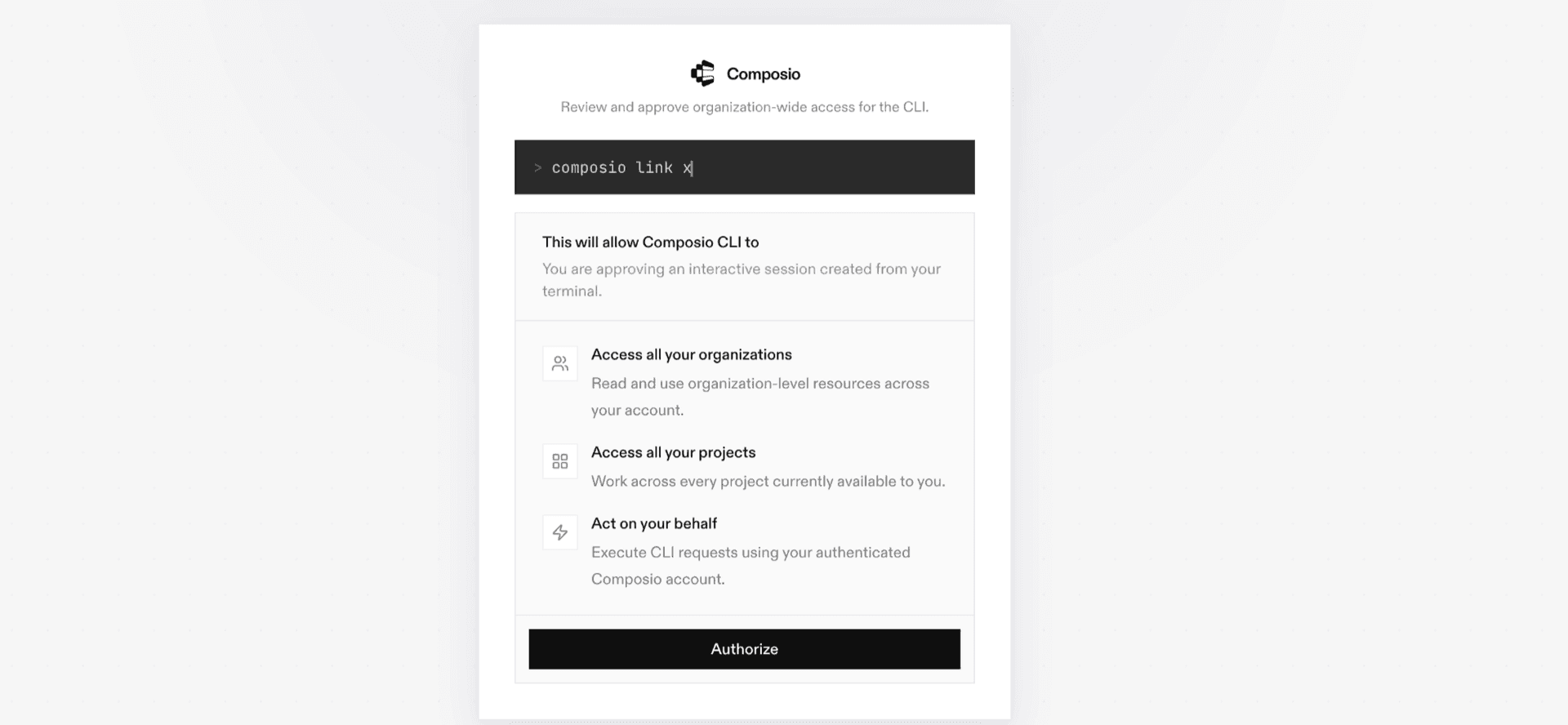
2. Authenticate

Once the CLI is installed, ask Hermes to authenticate with Composio.

3. Connect to Cardly

Ask your agent to connect to Cardly, or simply request any Cardly-related task. Hermes will prompt you to authenticate and authorize access.

4. Done. You're all set with a new Cardly connection.


Using Composio Connect MCP

1. Get your MCP URL and API Key

Go to dashboard.composio.dev and copy your Connect MCP URL and API key.

Copy MCP URL and API key from Composio dashboard

2. Open the Hermes config file

bash
nano ~/.hermes/config.yaml

3. Add the Composio Connect MCP server

bash
mcp_servers:
  composio:
    url: "https://connect.composio.dev/mcp"
    headers:
      x-consumer-api-key: "YOUR_COMPOSIO_API_KEY"
    connect_timeout: 60
    timeout: 180

Save with Ctrl + O, Enter, then exit with Ctrl + X.

4. Restart your Hermes agent

Once restarted, ask your agent to connect to Cardly or request any Cardly-related task. It will prompt you to authenticate and authorize access.

5. Done!

What is the Cardly MCP server, and what's possible with it?

The Cardly MCP server is an implementation of the Model Context Protocol that connects your AI agent and assistants like Claude, Cursor, etc directly to your Cardly account. It provides structured and secure access to your Cardly workspace, so your agent can create contact lists, generate card previews, manage invitations, and access artwork or credit history for seamless customer engagement tasks.

  • Automated contact list creation and management: Easily instruct your agent to set up new contact lists or manage existing ones, streamlining outreach campaigns and personalized mailings.
  • Card preview generation and artwork browsing: Let your agent generate watermarked card previews and browse available artwork to help you select the right designs before sending mailers.
  • Real-time credit and gift history access: Ask your agent to fetch your credit or gift credit history so you always know your account status and can track usage or plan new campaigns.
  • Invitation and webhook management: Direct your agent to handle invitations—listing, deleting, or auditing user invites—or manage webhooks for seamless integration with other systems.
  • Font and design asset exploration: Have your agent list available fonts and artwork, making it easier to choose creative assets for your next customer engagement initiative.

Way Forward

With Cardly connected, Hermes can now act on your behalf whenever it detects a relevant task or you ask it to.

From here, you can extend Hermes further:

  • Connect more apps: Calendar, Slack, Notion, Linear, and hundreds of others are available through the same Composio Connect setup. Each new integration compounds what Hermes can do for you.
  • Build workflows across tools: Once multiple apps are connected, Hermes can chain actions together — turn an email into a calendar invite, a Slack message into a Linear ticket, or a meeting note into a follow-up draft.
  • Let it learn your patterns: The more you use Hermes, the better it gets at anticipating how you'd handle recurring tasks. Give it feedback on drafts and decisions, and it will adapt.

If you run into trouble or want to share what you've built, join the community or check out the Docs for deeper configuration options.

TOOLS

Supported Tools

Every Cardly action and event your agent gets out of the box.

Create Contact List

Tool to add a new contact list.

Create Invitation

Tool to send an invitation to use your organisation portal.

Create Webhook

Tool to create a new webhook subscription.

Delete Invitation

Tool to delete an invitation by unique ID, immediately invalidating it for acceptance.

Delete Invitation by Email

Deletes a pending invitation by email address, immediately invalidating it and preventing acceptance.

Delete User

Tool to delete a user by unique ID, immediately revoking their access to your organisation portal.

Delete User by Email

Deletes a user by email address, immediately revoking their access to your organisation portal.

Delete Webhook

Tool to delete a webhook.

Echo Request

Tool to echo all request parameters, body, and headers for debugging purposes.

Generate Preview

Tool to generate a low-quality, watermarked preview document for a card.

Get Artwork

Tool to retrieve information on a specific piece of artwork by its unique ID.

Get Webhook

Tool to get details on an existing webhook.

List Artwork

Tool to retrieve the currently available artwork for your organisation.

List Contact Lists

Tool to retrieve all active contact lists for your organization.

List Credit History

Retrieves the account's credit transaction history showing all credits and debits.

List Doodles

Retrieve your currently available doodles from Cardly.

List Fonts

List available fonts for handwriting and text personalization in Cardly cards.

List Gift Credit History

Lists gift credit history records for your organization with pagination and optional time-based filtering.

List Invitations

Tool to retrieve active invitations for your organisation with optional filters.

List Media

Tool to retrieve the currently available media sizes for product artwork.

List Orders

Retrieves a paginated list of orders placed by your organization.

List Templates

Tool to retrieve your currently available templates from Cardly.

List Users

Tool to retrieve all users associated with your account.

List Webhooks

Retrieves all webhooks configured for your organization, including their status, target URLs, subscribed events, and delivery statistics.

List Writing Styles

Tool to list available writing styles.

Retrieve Account Balance

Tool to retrieve the current account and gift credit balances for your organisation.

Retrieve Order

Retrieves detailed information about a specific order by its ID.

Retrieve User

Retrieves detailed information about a specific user account by ID.

Update Webhook

Tool to update a webhook’s settings, including target URL and events.

FAQ

Frequently asked questions

With a standalone Cardly MCP server, the agents and LLMs can only access a fixed set of Cardly tools tied to that server. However, with the Composio Tool Router, agents can dynamically load tools from Cardly and many other apps based on the task at hand, all through a single MCP endpoint.

Yes, you can. Hermes fully supports MCP integration. You get structured tool calling, message history handling, and model orchestration while Tool Router takes care of discovering and serving the right Cardly tools.

Yes, absolutely. You can configure which Cardly scopes and actions are allowed when connecting your account to Composio. You can also bring your own OAuth credentials or API configuration so you keep full control over what the agent can do.

All sensitive data such as tokens, keys, and configuration is fully encrypted at rest and in transit. Composio is SOC 2 Type 2 compliant and follows strict security practices so your Cardly data and credentials are handled as safely as possible.

Start with Cardly.It takes 30 seconds.

Managed auth, hosted MCP servers, and every Cardly tool your agent needs.Free to start.

Start building